
Progress Column2.0 - Download
You'll be able to download in few seconds.
Publisher Description
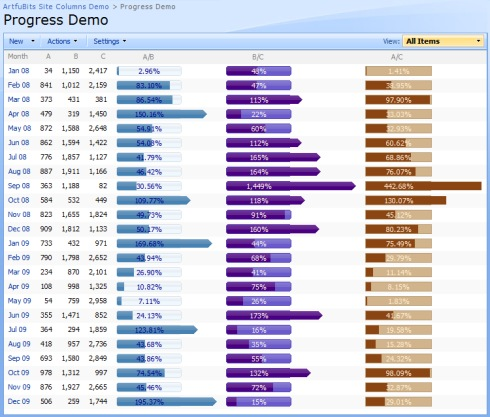
The progress bar is typically used when an application performs tasks such as project progress or sales activity. Users of an application might consider an application non-informative if there is no visual cue. By using the progress bar in your SharePoint lists, you provide the user with the rich and live information related to the status of values in your lists.
ArtfulBits Progress column provide users with the ability to make SharePoint lists more visual by allowing displaying numerical data in the page of percentage-based progress bar. Column settings are specified in order to adjust the column to your needs (background color, progress color, text color, progress width, etc.)
Professional progress bar style with elegant feature for displaying percentage values above 100% will make your SharePoint list modern and stylish.
You can easily convert ArtfulBits Progress column into standard numerical column and vice-versa in single click.
Features:
- Visualizes percentage data using graphical progress bar
- Professional progress bar look and feel
- Advanced look and feel customization
- Elegance way to percentage values above 100% (see screenshots)
- Two-way conversion between "ArtfulBits Progress" column and standard SharePoint percentage "Numeric" column
Why ArtfulBits Progress Column?
ArtfulBits Progress column allows you to display percentage value as progress bar. Fully customization allows you to set look and feel of progress bar regarding you site theme.
About Progress Column
This Components & Libraries program is available in English. It was last updated on 29 September, 2026. Progress Column is compatible with the following operating systems: Windows.
The company that develops Progress Column is ArtfulBits Inc.. The latest version released by its developer is 2.0.
The download we have available for Progress Column has a file size of 2.1 MB. Just click the green Download button above to start the downloading process. The program is listed on our website since 2013-05-06 and was downloaded 0 times. We have already checked if the download link is safe, however for your own protection we recommend that you scan the downloaded software with your antivirus. Your antivirus may detect the Progress Column as malware if the download link is broken.
How to install Progress Column on your Windows device:
- Click on the Download button on our website. This will start the download from the website of the developer.
- Once the Progress Column is downloaded click on it to start the setup process (assuming you are on a desktop computer).
- When the installation is finished you should be able to see and run the program.
Program Details
System requirements
Download information
Pricing
Version History
version 2.0
posted on 2013-05-06
New Features:
- Added SharePoint 2013 support
- Added RTL support
- Calculated value support added (based on other list columns)
- Added Datasheet view support (without converting), including edit mode
Improvements:
- Allowed assembly partially trusted callers
- Added "Save site as template" support
version 1.01
posted on 2010-01-03
Disclaimer
External Download
We do not host Progress Column on our servers. We did not scan it for viruses, adware, spyware or other type of malware. This app is hosted by the software publisher and passed their terms and conditions to be listed there. We recommend caution when installing it.
The external download link for Progress Column is provided to you by apps112.com without any warranties, representations or guarantees of any kind, so access it at your own risk.
If you have questions regarding this particular app contact the publisher directly. For questions about the functionalities of apps112.com contact us.
